Wednesday, March 2, 2011

And now the end is here...

Well, I've reached the end of my Web 2.0 adventures and I have learned a few things.
First, technology and the Internet are my friend.
I'm not proud of it but activities 1 and 2 did result in a number of mini meltdowns.
But I persevered!
And as I worked my way through the other 6 activities it became increasingly easier and more fun.
So, lesson 1:
Be confident, don't anticipate failure, and keep in mind it is usually easier than you think.

Second, Web 2.0, 3.0, and so on will be important to the future of libraries. So I better make it a habit to keep learning.
Lesson 2:
Don't abandon the past but be flexible, adaptable, and receptive to new ideas.

It looks like I'm picking up some of those habits of a lifelong learner after all!

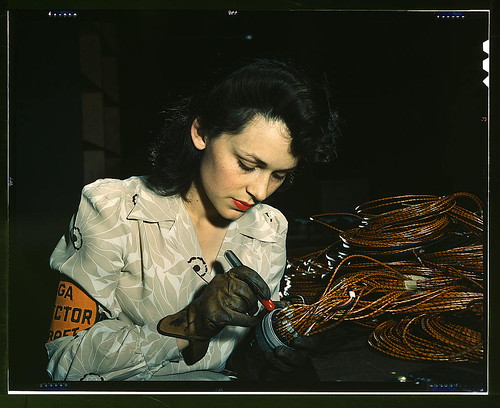
Library of Congress, Woman Aircraft Worker

Activity #8: Flickr

This activity was to look around Flickr and find an interesting photo to blog about.

In a previous post I included some info about the Library of Congress publishing some of their photo collections on Flickr. So my interest was piqued. The LC has all these pictures on their website but more people would find them through Flickr I suppose. Interesting, no?

All the photographs were terrific, but I picked one that reminded me of my grandmother. It is a picture of a "woman aircraft worker" circa 1939. My grandma worked for a shell manufacturing plant during WWII, so it made me think of her.

The picture is available through the following links:

<a href="http://www.flickr.com/photos/library_of_congress/2179930812/" title="Woman aircraft worker, Vega Aircraft Corporation, Burbank, Calif. Shown checking electrical assemblies (LOC) by The Library of Congress, on Flickr"><img src="http://farm3.static.flickr.com/2293/2179930812_1c734d4726.jpg" width="500" height="408" alt="Woman aircraft worker, Vega Aircraft Corporation, Burbank, Calif. Shown checking electrical assemblies (LOC)" /></a>

Activity #7: Play with an Online Image Generator

This is a just for fun activity. So I went to the FD Toys link and played around with some of their photo manipulators. It's kind of neat but I would like more ability to really customize layouts and what not.

The link to the website is:


And here is my picture that I created with their Pop Art Poster tool.


Ooops! I forgot to post the video..."Library of Congress' Flickr Strategy"

Activity #6: YouTube

This activity was to explore YouTube, find a video of interest and post it to my blog, and to consider ways elements of YouTube could be applied to library websites.

Of course like practically everyone else I am familiar with YouTube. Even if it is only to watch videos of adorable sneezing pandas. But, occassionally one stumbles onto content which is instructional or informative.

Case in point, I found a video which I think is particularly apropo for this blog posted by the Library of Congress. The video is...
"Voices TV: Featuring the Library of Congress' Flickr Strategy"
The video details the LC's use of Flickr to showcase their photograph collections. The hosts speak about the use of Flickr as a way to increase awareness about their photography collections. Interestingly, they also discuss how the choice to make content available on a site like Flickr was a way to gain experience using Web 2.0 to the libraries advantage.
Pretty cool!

But, back to YouTube...
Libraries could definitely use videos to reach out to patrons. Especially, now that so much of the libraries materials are digital or technology based resources. I work at the circulation desk in a library and the vast majority of questions are related to technological issues. I've been surprised at the amount of patrons who aren't comfortable with the online catalog let alone navigating the databases.

Libraries could easily upload instructional videos to their websites to more clearly and easily guide patrons through the intricacies of online tools.

Another way libraries could incorporate YouTube qualities into their websites would be to post videos about unique things going on there. For instance, a library that houses particularly rare or locally significant historical archives could create videos or a series of videos about their collections.

Activity #5: Web 2.0 Tools and the Web 2.0 Awards

This activity was to pick a website that was nominated for the Web 2.0 Awards and blog about it's pros and cons and potential for library use.

It was suggested to pick a category of interest and go from there. I picked a website from my absolute favorite category in life, FOOD! So I looked at Urbanspoon, a site I use frequently. Since I am already familiar with the tools and set up of Urbanspoon it's becoming clearer what Web 2.0 is really all about.

I like Urbanspoon for several reasons. First off, we can never decide where to eat so the various search categories usually help narrow our choices. I like that the site can be navigated by cuisine, location, price, ambiance, or special features. And while I may not necessarily always agree I usually find user reviews helpful.

Now, I'm not sure that I'm on the right track here but I see some potentially interesting applications that libraries could use to their advantage. I think this might be something more applicable to maybe a countywide library effort not individual libraries but here are a few ideas...
From Urbanspoon to a Library near you:
1. "Restaurants Near" category
Since libraries serve the community (and often a somewhat specific community) they could work to create a dynamic relationship with neighboring cultural centers, theaters, educational projects, community projects etc... It would be a way to engage in the broader community, advocate for the library, and provide even more services to their patrons.
2. "Can't decide where to eat?" widget
There may be things like this at some libraries but how about a "Can't decide what to read?" tool. Instead of setting categories to Italian, cheap, Tampa the patron could pick Fiction, 18th century, French...or whatever.
3. Special Features and User Feedback
This might be a little wierd but you never know. Libraries within a certain area could advertise for their unique qualities or services and patrons could make comments, suggestions, and so on.
4. Online Reservations
I think all libraries allow for online renewals and holds on materials so this might be redundant. But if libraries started using Web 2.0 technologies in such accessible formats like Urbanspoon then patrons could easily find and use tools like renewing books. Because as it is I'm afraid a lot of people remain unaware of all the tools available on most library websites.

So those are just a few ideas that libraries could take from commercial sites using Web 2.0 technologies.

Activity #4: Podcasts

Challenge... Find a podcast that interests you (perhaps one library related) and link the RSS feed into my blog.
Confession...I have heard a podcast or two but have heretofore relied entirely on my computer savvy husband to do all things tech related for me. I know it's shameful!
So I had absolutely no idea how to find podcasts or subscribe to them or to link them to something else. I am happy to report it was surprisingly simple and caused me no frustration.
I often listen to podcasts in the car and was happy to discover that the Library of Congress has a few podcasts on different topics. I subscribed to the series "Music and the Brain", but there are others on really interesting subjects like oral histories, digital preservation, and the National Book Festival.
I think podcasts could be a wonderful tool for libraries to create interest and excite people about topics, research, projects, events, and so on.

The Library of Congress: Music and the Brain

The Library of Congress: Music and the Brain

The Atheist Experience

The Atheist Experience

Yay! I linked a podcast to my blogger page :)

Library Thing for Librarians (and aspiring Librarians)

There is a group on the site called, "Librarians who Library Thing".
One way I will incorporate Library Thing into my professional practice is to become a member of the group because it is a great way to gauge trends, issues, and in general what other librarians are concerned with.
Especially, as a student I think there is a lot to be learned from reading librarians discussions. For example, I'm not certain if I want to focus on archives or public service libraries or academic libraries and it will be helpful to check out the various groups. There are archivists, catalogers, circulation, reference and several other groups.

Activity #3: Explore Library Thing

The 3rd activity is to create an account with Library Thing, add 5 books to my library, blog about my findings, and post a link to my catalog.

Well...I'm learning as I go. The post prior to this one was my attempt to share my catalog. But I'm not sure that was successful. But I think and hope this is the right link:

It should be clear by now that I am completely in the dark about almost everything Web 2.0, and Library Thing was no exception. So I set up my account and poked around the site for  a while. There are a lot of really neat features that I will actually use in the future.
Some of my favorite things are the groups, discussions, and reviews.
Reason #1: I don't usually have anyone to talk with about a new book I've read.
Reason #2: Sometimes I just don't know what to read next.

I also liked the use of Tags. I actually just started learning about how Metadata and tags work and it's helpful to see how they are applied. I like history so I clicked on the history tag and there are tons of sub-groups for different interests with various topics and discussions.

Also, It may be a bit voyeuristic but it is kind of interesting to see what other people who share your reading preferences are also reading. It seems like a good way to discover new books.

Home | LibraryThing

Home LibraryThing

Tuesday, March 1, 2011

RSS Feeds and Libraries

"How can libraries use RSS or take advantage of this new technology?" 
 
A significant issue I have become aware of is the importance of library advocacy. The ALA and other library associations all participate in advocating for the value of libraries, the need for funding, and on legislative matters. Libraries also play an important part in the communities they serve. For all these reasons (and I'm sure more) libraries could take advantage of the communication value inherent in RSS feeds.
 
The Library of Congress has multiple RSS feeds. Theirs keeps people abreast of the latest news ranging from,...well it's too many to list here, but from news, events, topics, preservation, new books, music, poetry,and on and on.

The link to the Library of Congress feed page is:
http://www.loc.gov/rss/#librarians


Activity #2: RSS Feeds

RSS Feeds are a revelation!
I was largely unfamiliar with RSS feeds but now that I have set up my page on Bloglines I have seen the light.
So... the activity involves learning a bit about how RSS feeds work, setting up an account on Bloglines, and subscribing to 10 feeds. Again I became a bit frustrated because apparently my husband has installed every spy ware mechanism possible on the computer. Then it took me a while to figure out that widgets aren't the same as RSS feeds. So I have ten widgets and ten RSS feed.
Once I figured out how to subscribe to the feeds that I wanted I became really excited about the format. The RSS feeds I chose are from news sources I regularly read anyway except streamlined and without all the adds and distractions. It's so simple and concise. I suppose that's why they call it "Really Simple Syndication".
So the ten RSS feeds I subscribed to are:
CM Library Readers Club
Bay News 9
NPR
The Hayden Planetarium
Al Jazeera
Scientific American
BBC
Reddit
White House.gov Blog
The New York Times

I also like the widgets because I have all my interests together on one page. I don't have to visit each website separately.
There's an awful lot of information out there nowadays which is a wonderful thing, but I like that the RSS feeds condense everything for you. I think it helps to keep us more informed in a more efficient way.

How to incorporate my blogging experience into professional practice...

Considering that blogging was my first activity and I was resistant to the challenge I'm a little more aware of my own limitations and how they conflict with my professional goals. As a librarian I want and will need to be flexible, open, and eager to learn new technologies because they will be an important part of librarianship in the future.

Activity #1: Blogging and Lifelong Learning

The first exercise is to set up a blog and try out a few initial postings. Done!
My initial trepidation with all things technological has been eased. I was pleasantly surprised by how clearly explained and uncomplicated the process was. Even for an admitted computerphobe like me.

I have never subscribed to a blog (except for the library blogs required for my LIS 5020 class) and have generally considered them to be indulgent. But I did not realize the prevalence of blogs dedicated to actual issues or the role they play in professional communities.

This leads me to the second part of this activity...lifelong learning. While I consider myself a person who values learning and the lifelong pursuit thereof I do resist learning about anything computer related. I tend to become frustrated easily and I think it's entirely possible that electronic devices cease to work properly in my presence.

Which brings me to the first lifelong learning habit that does not come quite so easily for me, to "view problems as challenges."
For me problems become challenges after the fact when everything has worked out well. But of course this sets up obstacles from the get go...so I'll work on that.

The habits that do come more easily are to set goals ("Begin with the end in mind") and to "accept responsibility for my own learning." Simply put because otherwise nothing would get done.

And perhaps the one that resonates the most with me is that it is never too late and you're never too old to learn. Wouldn't it be sad if we all just quit learning new things once we reached a certain age or achieved a certain milestone?

Learning 2.0

For this blog I will be using PLMC's Learning 2.0 program. If you would like to view their "23 Learning 2.0 Things" this is the link:

Well....

I have encountered my first frustrations with blogging or more accurately trying to find my blog again. Hopefully when I reach the end of the WEB 2.0 challenge the internet will no longer be my nemesis.